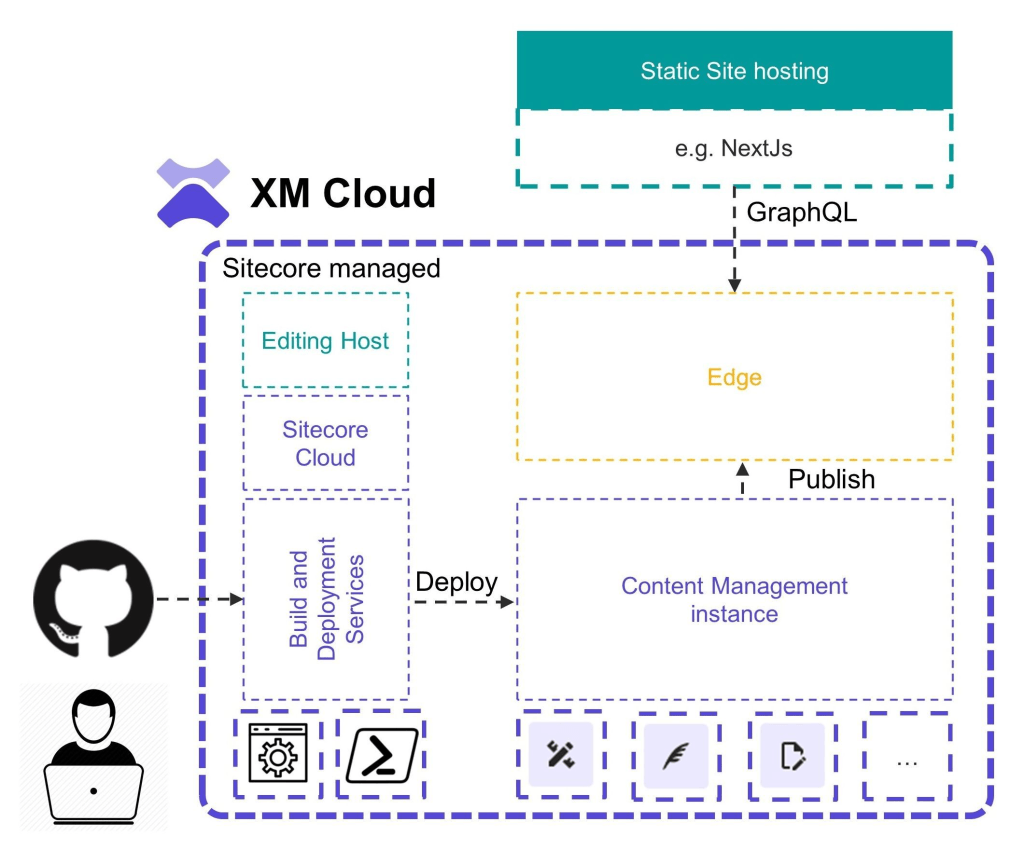
Sitecore XM Cloud is a headless CMS that offers a SaaS environment for developers. It includes the latest versions of Experience Manager, Sitecore Experience Accelerator (SXA), Sitecore Next.js SDK, Experience Edge, and the Pages content editor. Being the SaaS solution, it takes care of hosting, monitoring, and maintenance and developers can productively spend time on creating new functionality and integrating composable solutions.
For developers, mastering this platform can unlock immense potential for creating scalable, performant, and secure applications. In this blog, I’ll share some essential tips and best practices to help developers navigate and make the most of Sitecore XM Cloud.
Prerequisites
Before starting with Sitecore XM Cloud development, ensure the following prerequisites are met:
- A Sitecore XM Cloud subscription and necessary access credentials.
- The XM Cloud Deploy application requires following accesses(If not, then follow ‘No integration’ steps):
- Read access to metadata
- Read and write access to administration and code
- Access to all repositories
- Configure your project settings, including API keys, environment variables, and deployment settings in Sitecore XM Cloud Portal.
- The XM Cloud Deploy application requires following accesses(If not, then follow ‘No integration’ steps):
- Development tools: Visual Studio, Sitecore CLI, Docker, Node.js and Git.
- Familiarity with Sitecore’s architecture, Helix design principles, and basic knowledge of cloud services.
Structure in XM cloud
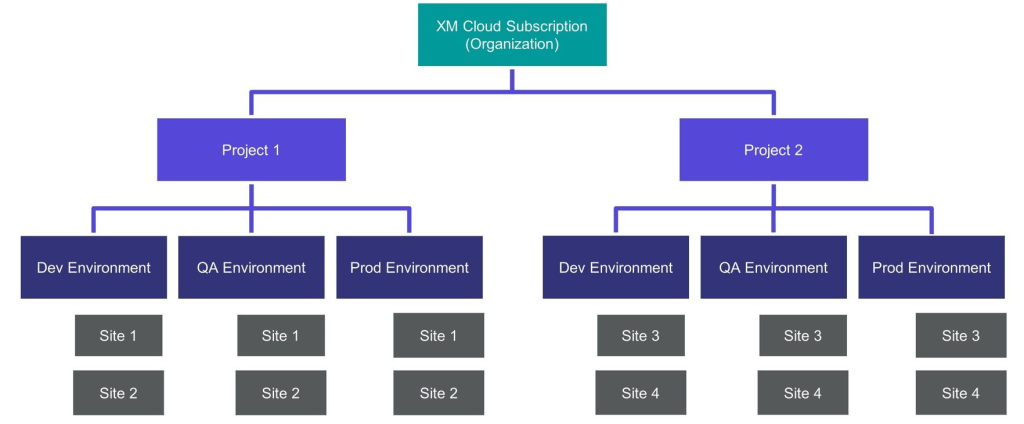
Depending on the licensing model of your subscription you’ll be able to create and manage 1 to many XM Cloud projects each one containing 1 to many XM Cloud environments.
Site Collections, Site Collection Folders and Site Folders
Every site should be in a Site Collection(say brand folder). If there are a lot of sites inside site collection, you can create Site Folders to group them.
However, site folders are optional. Sites within site collection shares following features:
- Can share content from one site to another
- Can create internal links between sites
- Can share the same page templates
Site Collection Folders are optional and used to organize site collections. Dedicated site collection helps in content separation.
Branching Strategy
A monorepo is the recommended approach to store your XM Cloud backend code, item serialization files and front end application code focus on trunk-based deployments. A monorepo is a single repository(a main branch) for all the code in an XM Cloud project.
It has following benefits:
- Code Sharing and Collaboration
- Atomic Commits
- Single Source of Truth
Other head applications, e.g. mobile apps, can live in their own repositories.
In monorepo approach in XM Cloud, it is required for all heads contained within the monorepo to be running the same version of Node if you want to use the inbuilt Editing Host functionality. However, if you donot want all heads to use same version, then use Editing Hosts externally
Content Serialization:
There are two distinct methods for deploying items to XM Cloud with Sitecore Content Serialization:
- Deploying Items to the File System using Items as Resources (IAR)
- This refers to items for developer control and should not be altered within the Content Management environment, unless potential impacts have been carefully considered.
deployItemsinxmcloud.build.jsonfile located at the root of solution is used for this. - {“deployItems: {“modules”: [ “Multisite”, “Localization”, … ]},…}
- Never use this method to serialize and synchronize individual media items – only use it for the parent media item folder. Using this method for individual media items can lead to performance issues.
- This refers to items for developer control and should not be altered within the Content Management environment, unless potential impacts have been carefully considered.
- Deploying Items to the Database using Post Deploy Actions
- This refers to items that are typically managed by a content author within the Content Management system(under home, etc.).
postActionsinxmcloud.build.jsonfile located at the root of solution is used for this. - { …, “postActions”: { “actions”: { “scsModules”: { “modules”: [ … ] } } } }
- This refers to items that are typically managed by a content author within the Content Management system(under home, etc.).
Continuous Integration/Continuous Deployment (CI/CD):
Set up CI/CD pipelines to automate build and deployment processes. When deploying the XM Cloud infrastructure elements, there are two options for how to go about this:
- Use the inbuilt XM Cloud Deploy Application and its GitOps approach
- Roll your own CI CD pipeline using your DevOps tooling of choice and the Sitecore CLI
By default, it’s best for customers to use the XM Cloud Deploy app. This helps them get to market faster, and they’ll automatically get the benefits as the tool gets better. However, there are some the challenges to use it:
- Currently, only GitHub and Azure DevOps are supported for source control. If you use a different provider, you won’t be able to use Deploy Application.
- Without a Service Account with administrator privileges on your source control system for the Deploy application to provision and manage repositories and branches, you won’t be able to use the Deploy Application.
- If you’ve invested in CI/CD tooling for other parts of your infrastructure and want to manage all deployments from a single location, you might opt to use the CLI to provision your own deployments.
- If your development team uses multiple repositories(poly-repo approach) for the CM and web application code, you will need to use the CLI to deploy your code as the Deploy app requires all the code to be in the same repository.
NOTE: Whether you let the XM Cloud Deploy application create the repository, or you use your own, ALL XM Cloud implementations must start with the XM Cloud Foundation Head repository.
Rendering host:
Currently, XM Cloud has a Vercel connector to provision your site directly from within the XM Cloud Deploy Application. It’s recommended to use this connector for deployment to Vercel when possible. However, there may be scenarios where separate deployment management is necessary.
- You’re not using Vercel to host your head.
- You’re not using a Monorepo and your head and XM Cloud application elements are stored in separate repositories.
- You’re using the CLI to deploy XM Cloud, and want to manage your head deployments using the CI/CD tooling.
Customizing the Platform: Components in XM Cloud:
1. Modular Components
- Independence and Modularity: Ensure components are independent and modular. They should not depend on specific nesting or structuring, allowing content authors to freely move components around a page.
- Interchangeability: Build components so they can be used interchangeably without affecting their functionality or appearance.
2. Consistent Naming Conventions
- Align on Naming: Ensure component naming conventions align with how components are structured in Sitecore.
- Storage Locations: Store components under
sitecore/Layout/Renderings/Project/<site collection name>, using sub-folders for logical grouping. - Headless SXA Components: Follow the structure of out-of-the-box (OOTB) Headless SXA components. In your source code, the component implementations (
.tsxfiles) can be found using the same name under./src/<site collection name>/src/componentsand move into sub folders that makes logical sense for the project
Cloning Components
- Clone Existing Components: Make sure to create new components by cloning existing OOTB components.
React/Next.js Component Structure
- Component Matching: Each rendering item must have a matching React/Next.js component under
./src/<site collection name>/src/components/<folder>. - Atoms and Molecules: Build smaller, simple components (atoms) and use them to create more complex components (molecules). Store atoms outside the components folder, e.g.,
./src/<site collection name>/src/atoms/<folder>.
Export Only Content Editable Components
- Export Strategy: Export only those components intended for use by content authors and that map directly to a rendering item or headless variant.
Use Placeholders
- Avoid Hardcoding Structures: Do not define component nesting structures through code. Use the Placeholder component provided by JSS and placeholder restrictions to guide authors on component usage.
Avoid Hardcoded Text/Multimedia
- Field Components: Use Field components provided by JSS for text and images, e.g.,
<Text field={} />,<Image field={} />.
Headless Variants
- UI Variations: Handle UI variations via headless variants. Create Headless Variant items under
/sitecore/content/<site-collection-name>/<site-name>/Presentation/Headless Variants/<component-name>. - Naming and Thumbnails: Name variants descriptively and use thumbnails to identify different variants in the Pages editor.
Using SXA for XM Cloud development : Tips and best practices
API Integrations
XM Cloud supports API-first integrations with a focus on headless architecture. You can use:
- REST APIs: You can execute many XM Cloud operations using publicly available REST APIs. Manage and deploy environments, work with Sitecore Components.
- Webhooks: Integrate XM Cloud with other applications for real-time updates.
- GraphQL: Query globally replicated, scaled XM Cloud items, layout, and media via Experience Edge for XM. Used for querying Sitecore Content Hub and other graph-based data sources
Good Luck!
 Tech with Jagmeet
Leave a comment