This guide covers key concepts and terminology related to XM Cloud.
A[Organization] --> B{Projects}
A[Organization] --> C{Projects}
B --> E1[Environment1]
B --> E2[Environment2]
C --> E3[Environment3]
E1-->D[Site]
D-->A single Content Management (CM) instance
D-->Experience Edge tenant
D-->Databases
D-->Indexes
D-->Automation clients
D-->Environment variables
D-->Rendering hosts
D-->An app tenant connecting the CM instance with features like Pages and Components
Organization
An organization represents a business unit, such as a company or brand. In Sitecore, it’s a collection of your team members and the Sitecore products you subscribe to. An organization can have multiple Sitecore products and instances.
Larger companies or solution partners might manage multiple organizations, while smaller companies might have just one. Access rules within each organization determine user permissions and roles. Organization management is handled through the Cloud Portal.
Project
A project is a logical grouping of XM Cloud environments, which can include development, testing, and production environments. Projects can be created using the Deploy app, CLI, or REST APIs.
Creating a project with the Deploy app automatically sets up one environment, which can be designated as a production environment for faster support. The number of projects you can create depends on your subscription.
Environment
An environment contains configurations, code, and implementations. Each environment includes:
- A single Content Management (CM) instance
- Experience Edge tenant
- Databases
- Indexes
- Automation clients
- Environment variables
- Rendering hosts
- An app tenant connecting the CM instance with features like Pages and Components
Environments are isolated, allowing for unique customizations, deployments, and configurations.
Content Management Instance
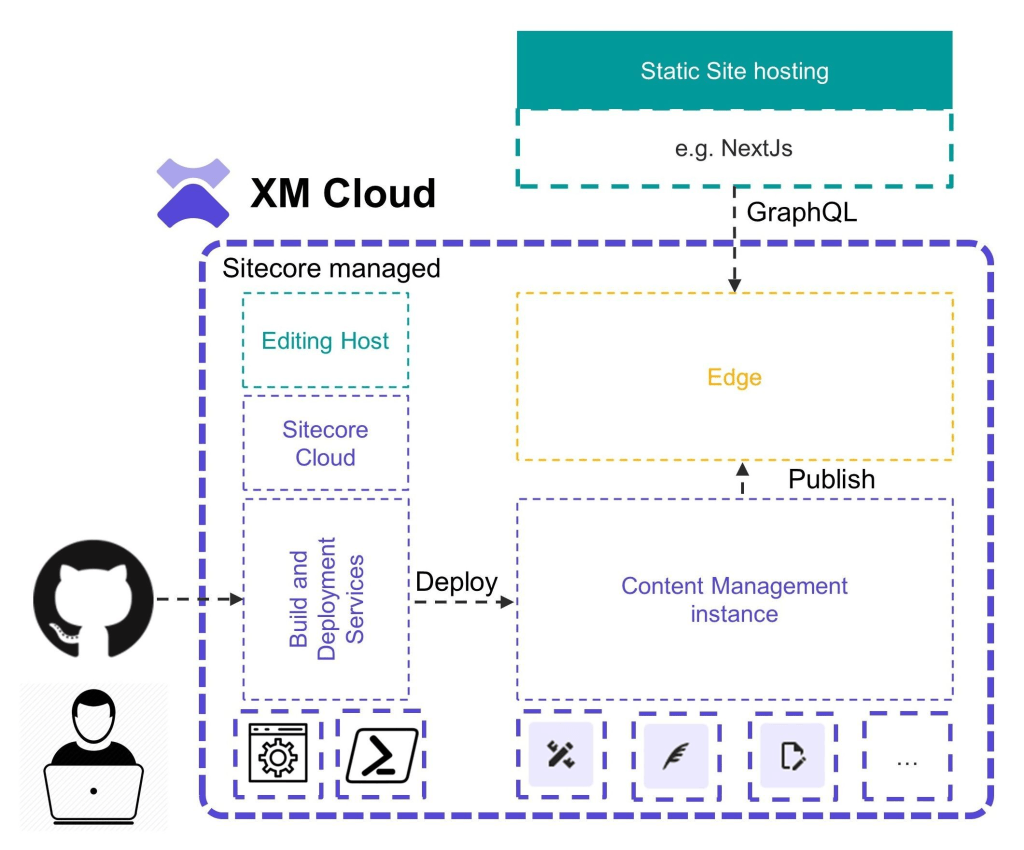
The Content Management (CM) instance is central to your XM Cloud environment. It is where you create, store, and edit site content, and manage publishing, content modeling, versioning, workflows, translations, rules, and permissions. The CM instance includes page layouts, components, data source configurations, localization, and personalization settings, delivering data to Experience Edge via GraphQL.
Site
A site is a collection of one or more pages, each containing multiple components. In XM Cloud, all sites are headless, meaning the front-end application and rendering host are separate from the content modeling and business logic.
Site Collection
A site collection is a parent item that groups related sites for organizational purposes, such as by business unit or brand, and enables content sharing between sites, like data templates and digital assets.
XM Cloud Foundation Template
The foundation template serves as the base for most XM Cloud implementations. It is open source and available on GitHub. Selecting the foundation template when creating a new project ensures you have the latest and most stable versions of recommended assets, references, assemblies, and artifacts. It includes:
- Local development workstation resources for debugging and testing
- JSS and headless libraries
- Headless SXA reference components in Next.js
- Personalization and analytics middleware
Sitecore Cloud Portal
The Sitecore Cloud Portal is the central hub for accessing all Sitecore digital experience platform (DXP) products. It allows you to manage your organization, users, and access to apps like XM Cloud, Content Hub ONE, and the XM Cloud Deploy app. Access it at https://portal.sitecorecloud.io.
Deploy App
The XM Cloud Deploy app is a user interface for managing environments and deploying XM Cloud projects. It guides you through creating a project, logs every step of the deployment process, provides a status page, and centralizes project and environment management. After project creation, it runs the following processes:
- Provision
- Build
- Deploy
Rendering Host
The front-end application is also referred to as “the rendering host,” and it is used for displaying the website to your audience. You host the application on platforms such as Vercel.
This application is set up and scaled to serve live traffic.
Experience Edge
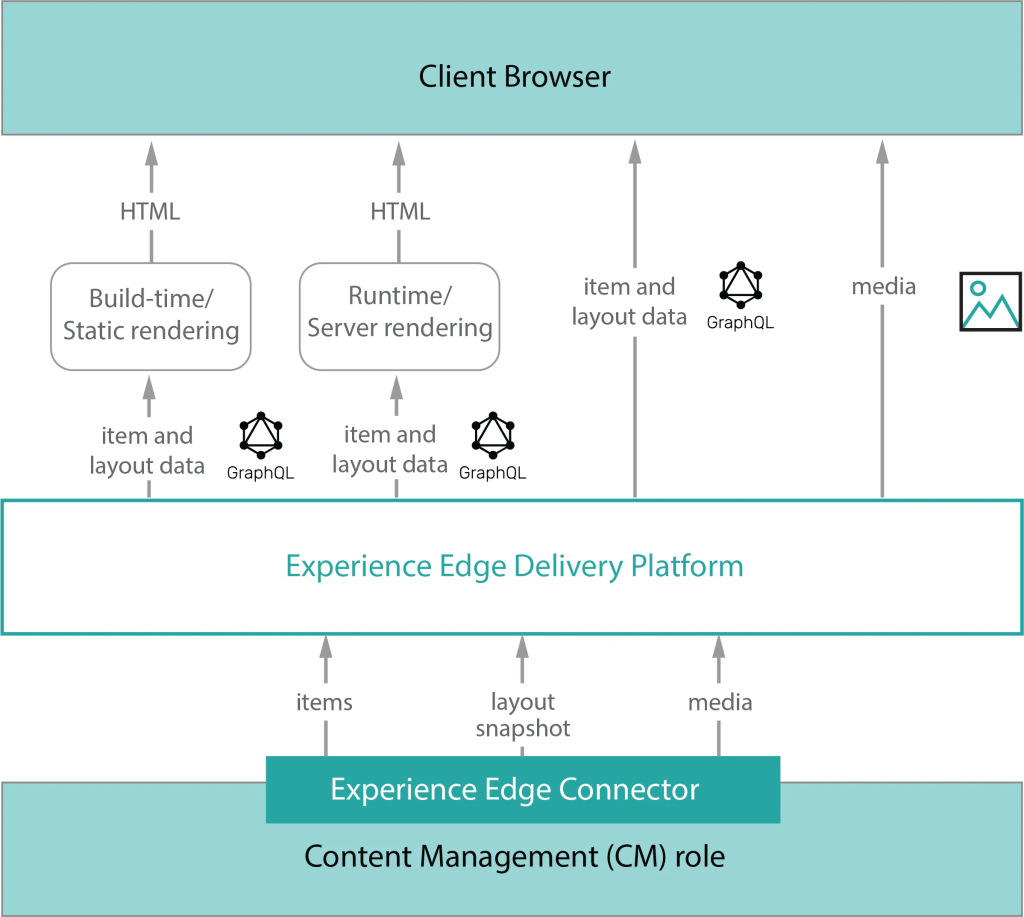
Experience Edge is a GraphQL API-based service endpoint that retrieves layout and content distributed through a CDN. It is the XM Cloud publishing target, hosted by Sitecore.
Environment Variables
Environment variables are key-value pairs that control core aspects of your XM Cloud environment setup. Stored outside the source code, they simplify configuration changes. In Next.js applications, they are stored in an .env file, and in local development scenarios, in env.local. XM Cloud has three types of environment variables: system, user-controlled, and custom.
System Environment Variables
These settings control core aspects of your XM Cloud environment. They can be changed for local development and when using an external rendering host, but not in a production XMC environment.
User-Controlled Environment Variables
Predefined variables in XM Cloud environments that you can control.
Custom Environment Variables
In addition to predefined variables, you can create custom key-value pairs for tasks such as connecting to third-party systems.
 Tech with Jagmeet
Leave a comment