itecore XM Cloud continues to be a leader in the realm of headless CMS solutions, and its latest innovation, Sitecore Pages, enhances the content authoring experience. Sitecore Pages is an intuitive, feature-rich editing tool designed to streamline the creation, modification, and management of web pages. For developers, marketers, and content authors alike, it offers a user-friendly and seamless experience within the cloud-native Sitecore XM environment.
In this blog, we’ll explore the key features of Sitecore Pages, how to configure it, and what makes it a standout tool for creating digital experiences.
What is Sitecore Pages?
Sitecore Pages is a new visual authoring tool within XM Cloud, designed for marketing and content teams to build and manage pages quickly without needing deep technical knowledge. It supports drag-and-drop functionality, offers real-time previewing, and integrates easily with the headless backend provided by XM Cloud.
While the traditional Sitecore Experience Editor is great for on-premise solutions, Sitecore Pages takes the XM Cloud-native approach to the next level with cloud-first capabilities, simplified workflows, and a clean, modern UI.
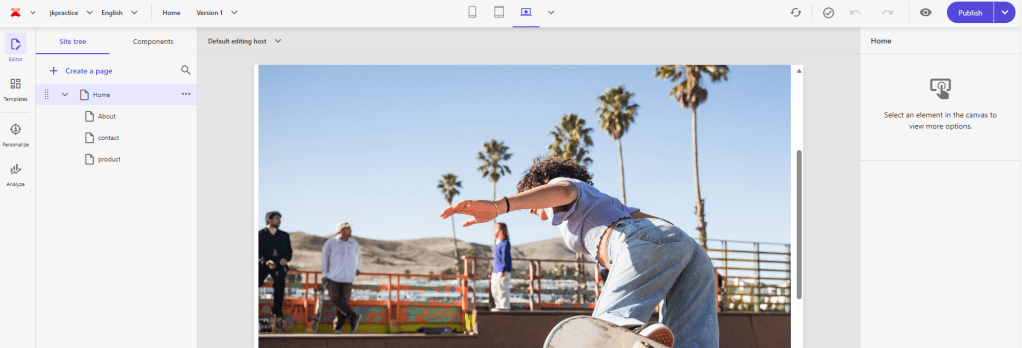
Key Features of Sitecore Pages
- Drag-and-Drop Interface:
- With the intuitive drag-and-drop interface, users can quickly build complex layouts by dragging components into placeholders, adjusting their properties, and organizing page elements with ease.
- Real-Time Preview:
- Sitecore Pages allows users to see their changes reflected immediately as they edit, reducing the guesswork that typically comes with page editing.
- Content Reusability:
- Content authors can reuse components across different pages, ensuring consistency while also speeding up page creation processes.
- Version Control and Publishing:
- The tool comes with built-in version control, allowing users to maintain and roll back to previous versions of pages as needed. The publishing workflow is straightforward, offering granular control over when and how content goes live.
- Headless-First Design:
- Sitecore Pages is built with a headless architecture in mind, making it highly adaptable to decoupled front-end experiences, whether built with React, Vue, or any other JavaScript framework.
How to Configure Sitecore Pages in XM Cloud
1. Accessing Sitecore Pages
- Once logged into the XM Cloud environment, you can find Sitecore Pages within the XM Cloud App. The interface is immediately accessible to authorized users, whether they are content authors, developers, or marketers.
2. Configuring Page Templates and Layouts
- Page Templates: As a developer, you’ll define templates that outline the structure of different page types (homepages, landing pages, blog posts, etc.). Templates contain placeholders where authors can insert content blocks and components.
- Layout Service: For headless implementations, the Sitecore Layout Service provides dynamic rendering of content. It’s essential to configure layouts to define where components and dynamic content will appear.
3. Creating Components for Reuse
- Sitecore Pages encourages modularity through components. Components are predefined chunks of functionality (e.g., hero banners, call-to-action buttons, carousels) that can be dragged onto pages. To configure reusable components:
- Create component definitions in your Sitecore XM instance.
- Map these components to your front-end presentation layer (React, Vue, or other framework).
- Enable personalization and editing options based on user roles.
4. Setting Up Headless Data Sources
- Headless Content: Since Sitecore Pages is designed for headless content delivery, data sources and APIs must be set up to pull in content dynamically. This involves:
- Configuring APIs for headless data sources.
- Integrating with your front-end to consume content as JSON via the Layout Service or GraphQL endpoints.
5. Personalization and Testing
- Personalization is a core feature of Sitecore. Sitecore Pages allows you to configure personalized experiences based on user profiles, behaviors, and journey stages. In XM Cloud, you can test and preview these personalized experiences within the Pages editor.
6. Workflow and Permissions
- Set up workflows to ensure content goes through the proper review and approval processes. User roles and permissions ensure that only authorized individuals can make changes or publish content.
Best Practices for Using Sitecore Pages
- Component-Based Architecture:
- Build content using modular, reusable components. This approach allows for faster development and maintenance, as well as a more consistent look and feel across your site.
- Enable Personalization from the Start:
- Configuring personalization rules during the initial setup phase will save time later on. Sitecore XM Cloud offers robust tools for targeting and personalizing content based on specific audience segments.
- Test Early and Often:
- Use the built-in preview and testing tools to check how content will render across different devices and audience segments.
- Optimize for Performance:
- Since Sitecore XM Cloud operates in a headless environment, ensure that your APIs are optimized for fast response times. Caching strategies can also help improve performance.
Conclusion
Sitecore Pages is a powerful tool in XM Cloud that offers flexibility, ease of use, and scalability for content creators. Whether you’re building a landing page, personalizing a user’s journey, or integrating headless front-end frameworks, Sitecore Pages simplifies the process, empowering teams to deliver engaging experiences faster and more efficiently.
By configuring reusable components, integrating headless content sources, and leveraging the built-in tools for testing and personalization, Sitecore Pages sets the stage for seamless digital experience management in the cloud.
 Tech with Jagmeet
Leave a comment