XM Cloud is a powerhouse of tools and capabilities, designed to streamline the development and management of websites. Whether you are an experienced Sitecore developer or just getting started, XM Cloud offers a range of capabilities to set up, integrate, and maintain your projects with ease. In this blog, we will explore the key developer tools that XM Cloud provides, helping you understand how each one can enhance your workflow and project efficiency.
Deploy App: Simplifying Project Management
The Deploy App is an intuitive user interface that gives user friendly project management experience. With the Deploy App, you can:
– Create and Manage Projects: Easily set up new projects and manage existing ones.
– Manage deployments, configure variables and check logs
– Configure Source Control and Hosting Providers: Seamlessly integrate your preferred source control and hosting services. Currently GitHub and Azure DevOps are supported.
– Manage Credentials: Securely store and manage credentials needed for various integrations.
– Check System Status: Monitor the health and status of your projects in real-time.

This tool is great to streamline deployment processes and maintain a clear overview of their projects and environments.
Sitecore CLI: Command Line Powerhouse
The Sitecore CLI (Command Line Interface) is a robust command line interface that supports all core XM Cloud functions. It offers a wide range of commands, subcommands, and options, enabling you to:
– Create Settings, Items, and Configurations: Set up and manage various configurations directly from the command line.
– Data Modelling: Define and manage your data models efficiently.
– Test and Verify Content: Ensure your content is accurate and performs as expected.
– Monitor Implementation: Keep track of your project’s implementation details and status.
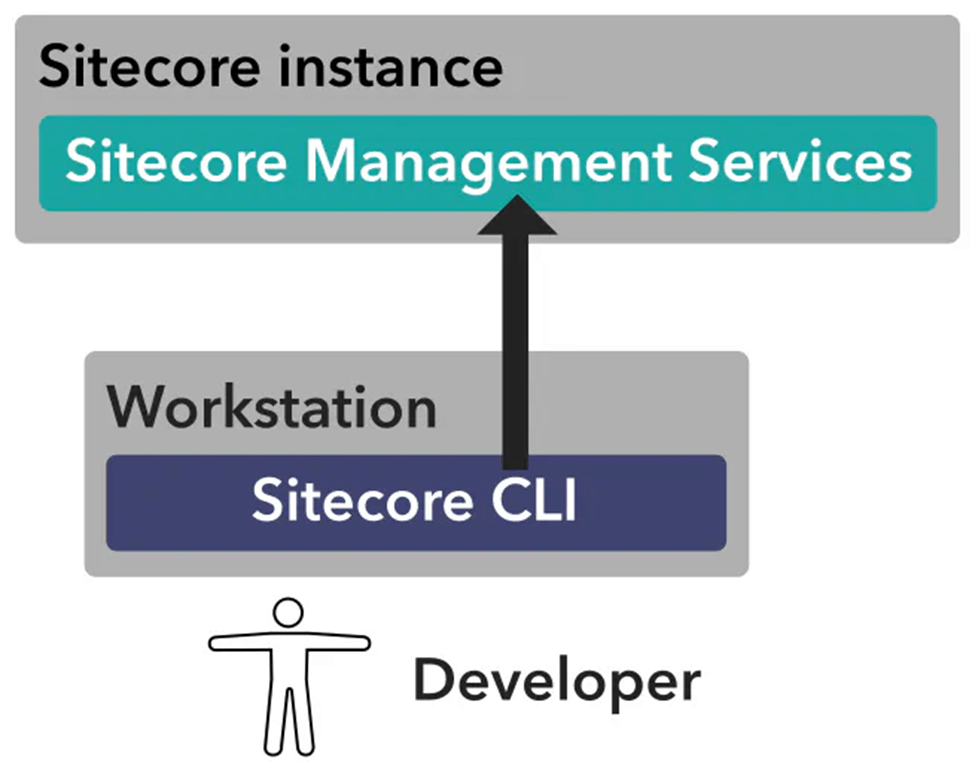
For developers who prefer working in the command line environment, the Sitecore CLI provides powerful functionalities that enhance productivity and control.
GraphQL: Flexible and Powerful Queries
XM Cloud leverages GraphQL for performing queries and mutations on content. Both the Experience Edge and content management instance utilize GraphQL. It provides:
– Maintainable and Discoverable Queries: Easily manage and discover your queries and data relationships.
– IDE with Built-in Documentation and Validation: Use the integrated development environment (IDE) to write, test, and validate your queries with ease.
GraphQL’s flexibility and efficiency make it an invaluable tool for developing dynamic and responsive web applications.
REST APIs: Versatile Integration
XM Cloud provides publicly available REST APIs that enable you to:
– Manage and Deploy Environments: Control your deployment environments programmatically.
– Work with Sitecore Components: Integrate and manage Sitecore components seamlessly.
REST APIs offer a versatile way to interact with XM Cloud, providing the flexibility needed for custom integrations and automated workflows.
Webhooks: Real-time Integration
Webhooks in XM Cloud allow for real-time integration with other applications. They are triggered by specific events, such as:
– Publishing Jobs: Receive notifications when a publishing job finishes.
– Entity Changes: Get real-time updates when entities change.
Webhooks are perfect for creating responsive and interactive applications that need to react to changes immediately.
JSS for Next.js: Dynamic Front-end Development
The JavaScript SDK for Next.js (JSS) provides a starter application with all the necessary functionality to display content and layout from XM Cloud. It supports:
– Personalization and Tracking: Implement personalized content and track user interactions.
– Localization and Multisites: Easily manage multiple sites and localized content.
– Integration with composable Sitecore products and services: Seamlessly integrate with other composable Sitecore products and services.
JSS for Next.js simplifies front-end development, allowing you to build dynamic and interactive web applications efficiently.
Serialization: Safe Data Management
Sitecore’s serialization standard ensures that data stored in the content management system (CMS) and database is:
– Organized and Formatted: Maintain a consistent structure for your data.
– Extractable and Migratable: Safely extract and migrate content without compromising data integrity.
– Shareable: Easily share content across different environments and projects.
Serialization is crucial for maintaining data integrity during content management operations, migrations, and sharing.
XM Cloud’s rich offering of developer tools empowers developers to efficiently manage and integrate their websites. From the intuitive Deploy App and powerful Sitecore CLI to the flexible GraphQL and versatile REST APIs, these tools provide everything you need to build, deploy, and maintain high-quality web applications. Whether you are dealing with real-time integrations using webhooks or developing dynamic front ends with JSS for Next.js, XM Cloud ensures a smooth and efficient workflow for all your web development needs.
 Tech with Jagmeet
Leave a comment