In the ever-evolving digital landscape, personalization has become a cornerstone of effective marketing strategies. With the rise of customer-centric approaches, businesses must tailor their content to meet the unique needs and preferences of their audience. Optimizely SaaS CMS offers a robust platform to achieve this, enabling businesses to deliver personalized experiences that delight and convert. Here’s how you can leverage Optimizely to enhance your personalization strategy.
Understanding Personalization
Personalization involves creating a unique experience for each user based on their behavior, preferences, and demographics. This can range from simple tactics like addressing users by their names in emails to more complex strategies like recommending products based on past purchases.
Why Optimizely SaaS CMS?
Optimizely SaaS CMS stands out due to its powerful features and flexibility. It allows marketers to create, manage, and optimize content across multiple channels, ensuring a seamless and personalized user experience. Here are some key features that make Optimizely an excellent choice for personalization:
- User Segmentation: Optimizely enables you to segment your audience based on various criteria such as behavior, location, and demographics. This helps in delivering targeted content that resonates with each segment.
- Behavioral Targeting: By tracking user behavior on your site, Optimizely allows you to deliver personalized content in real-time. For example, if a user frequently visits a particular product category, you can highlight related products or offers.
- A/B Testing: Optimizely’s robust A/B testing capabilities allow you to experiment with different content variations to see what works best for your audience. This data-driven approach ensures that your personalization efforts are effective.
- Content Recommendations: Using machine learning algorithms, Optimizely can recommend content that is most likely to engage your users. This not only enhances user experience but also increases the chances of conversion.
Implementing Personalization with Optimizely
Before You Start
Make sure to:
- Set Up Pages: These are the sections of your website you want to personalize.
- Define Events and Tags: Events track user actions like clicks or purchases.
- Create Audiences: Group users based on shared behaviors or attributes.
These elements can be reused across multiple campaigns, saving time and effort.
Steps to Create Your Campaign
1. Start a New Campaign
- Go to Optimizations > Personalization Campaigns > Create Personalization Campaign.

- Name your campaign.
- Optionally, add a description to clarify the campaign’s purpose.
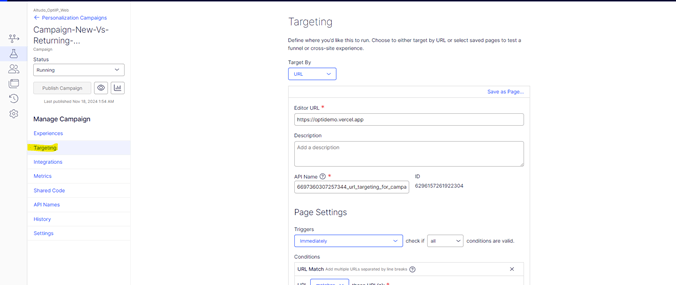
2. Set Up Targeting
- Use the Target By drop-down menu to select where your campaign will run:
- URL: Enter the exact page address manually.
- Saved Pages: Choose from existing pages or create a new one.
3. Add Metrics to Track Success
- Select events that align with your campaign goals, such as clicks on CTAs or total revenue generated.
- Optimizely allows one primary metric (the most important one) and up to five secondary metrics.

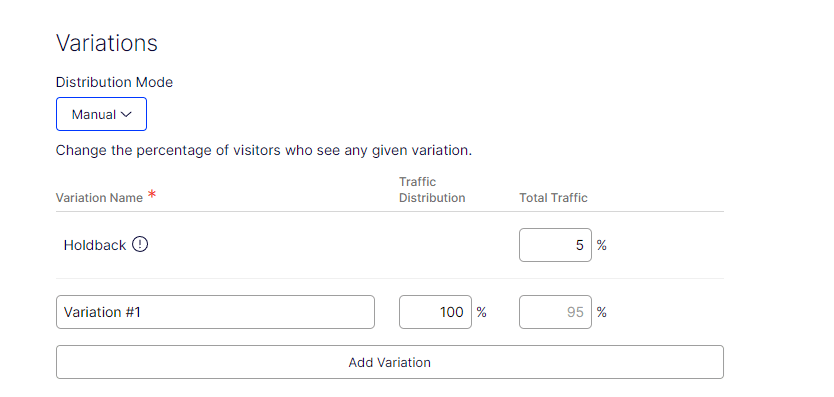
4. Adjust the Holdback Size
- Holdback refers to the percentage of visitors who will not see the personalized experience. This helps measure your campaign’s overall effectiveness.
- By default, Optimizely sets the holdback to 5%, but you can adjust it as needed.
Designing Your Experiences
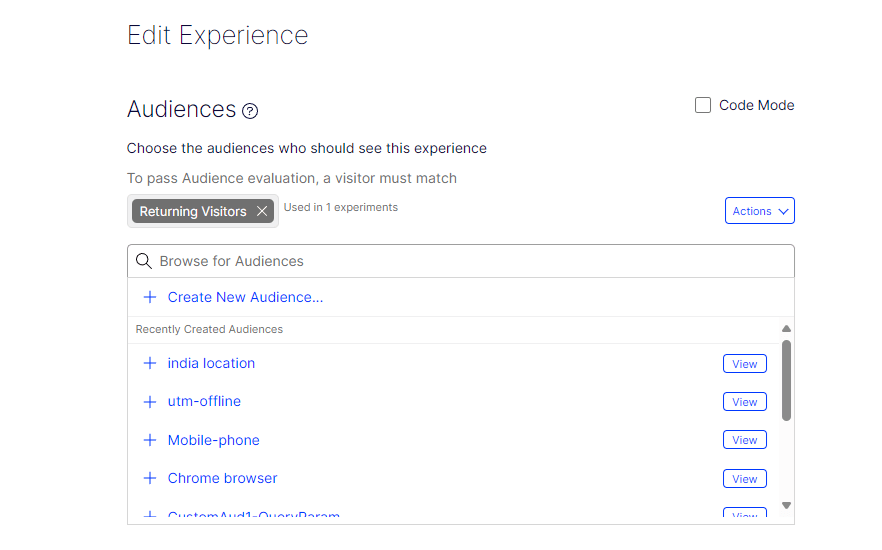
1. Add and Prioritize Audiences
- Select or create audiences for your campaign. For example, you might target visitors from specific countries or repeat customers.
- Drag and drop to rank audiences by priority. If a visitor fits multiple audience criteria, they’ll see the experience assigned to the highest-priority audience.
2. Customize Experiences
- Use the Visual Editor to design unique experiences for each audience.
- Click elements on your site to edit text, images, or styles directly.
- Save and preview your changes to ensure they look right.
Testing and Launching Your Campaign
- Preview Your Campaign: Use Optimizely’s Preview tool to see how your changes appear to visitors without making them live.
- Start the Campaign: Once satisfied, click Start Campaign to release it.
- Keep Improving
After launching your campaign, monitor performance and adjust your targeting, metrics, or content as needed. Optimizely’s analytics tools make it easy to track results and refine your strategy for better outcomes.
By following these steps, you’ll be well on your way to delivering engaging, personalized experiences that delight your audience and drive results.
Overcoming Common Challenges
- Data Privacy Concerns
Personalization often involves handling user data. Optimizely includes built-in compliance tools to ensure adherence to privacy regulations like GDPR and CCPA. - Avoiding Overpersonalization
Balance is key. Too much personalization can feel invasive. Focus on adding value rather than simply targeting. - Scaling Effectively
Start small, refine your strategy, and scale gradually as you build confidence in your personalization framework.
Conclusion
Personalization is no longer a buzzword—it’s the cornerstone of modern digital strategies. Optimizely SaaS CMS provides the tools and insights to craft experiences that not only engage but also convert your audience. By combining data-driven insights, dynamic content, and continuous experimentation, you can create a seamless, personalized journey for every user.
Start delighting your audience today with Optimizely and watch your engagement and conversions soar.

 Tech with Jagmeet
Leave a comment