Working with data sources and media
- Clean up unused data sources
- Do not put media items directly under the site’s Media folder and instead use the general Media Libary folder (sitecore/Media Library).
- Give site data sources meaningful names and organize site data sources in folders
- Run source field reports to help set the data source context. The Source field specifies where the user is allowed to look for the data source.
Extending SXA
- Never put custom items in SXA-controlled branches of the tree. Place custom modules in a branch that is a sibling to the Headless Experience Accelerator module root.
- Do not modify OOTB SXA items
- Create an SXA module for your custom renderings
- Provide site/site collection scaffolding integration for your modules.
- Include data source definitions for your components (or re-use OOTB SXA data sources).
- Define site-relative queries for your data sources.
Base your custom templates for pages on the Page template
When you create a custom template that represents a page, you must select the Page template as your base template. Otherwise, certain functionality might not work.
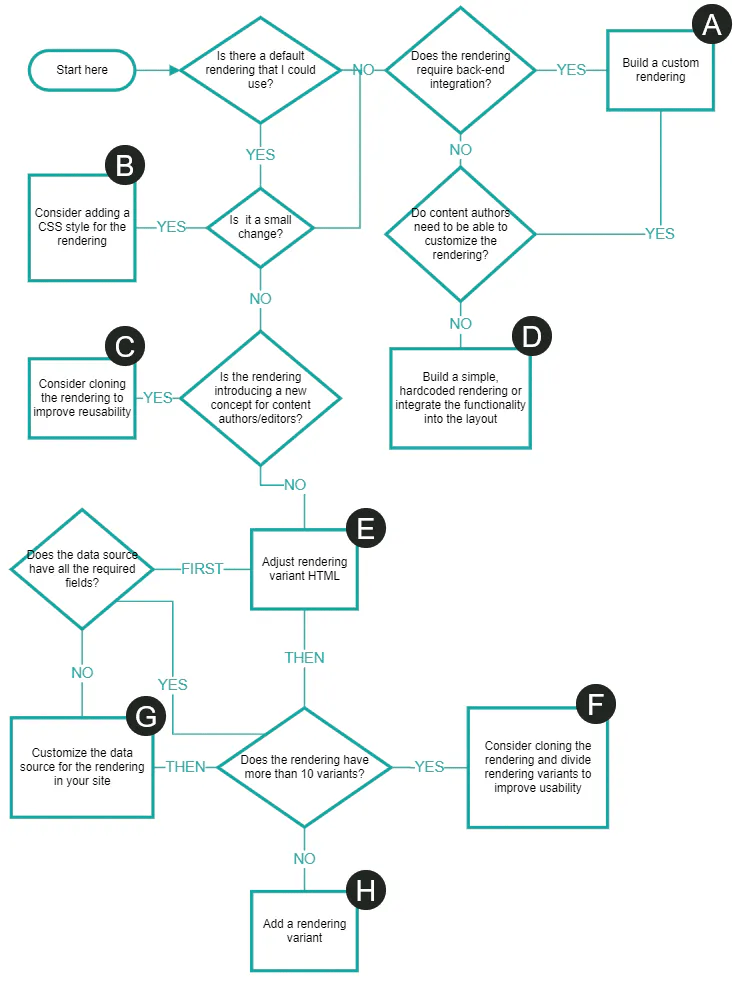
Consider using existing renderings before building a new one
Limit scope of fields linking to items with queries
Sharing content
- Consider defining your rendering variants, page designs and partial designs in the shared site
- Consider creating a master site to clone for a rollout to new markets
- Consider using delegated areas for pages that share content across sites

- Consider using a shared site as the exclusive style container in a site collection to avoid duplicated styles and redundancy.
Structuring pages
- Set placeholder restrictions
- Use site-specific page branches instead of standard values to set modifiable presentation details for your pages
- Use partial design inheritance
- Prioritize changing the grid settings of a rendering over using splitters to change the layout of a rendering
Enhancing SXA performance
- Limit the number of renderings on a page(<30)
Using renderings
- Use the proper rendering for the job. Avoid using versatile renderings such as Page Content, Page List, Promo, or Rich Text to render most of your page layout.
- Make sure the Rich Text field content is fully editable
Hope this helps, Good luck!
 Tech with Jagmeet
Leave a comment